
Overview
Having migrated a system to Azure Managed Instance (MI), there are several options that used to be available via SQL Studio Management Studio (SSMS) that are no longer. Amongst these is the ability to change the values for SQL Server Agent job history.
Background
One of our scheduled jobs had sent a series of alert emails, as something was not behaving as expected. I didn’t consider this particular alert as being an urgent matter and decided I would get to it in due course.
It wasn’t until the following day that I managed to find the time and there was no trace of the error in the job history. In fact, the job history didn’t go back very far at all. It didn’t have anything from the previous day.
The obvious cause of this were the values that determine how long job history is kept.
Old World/New World
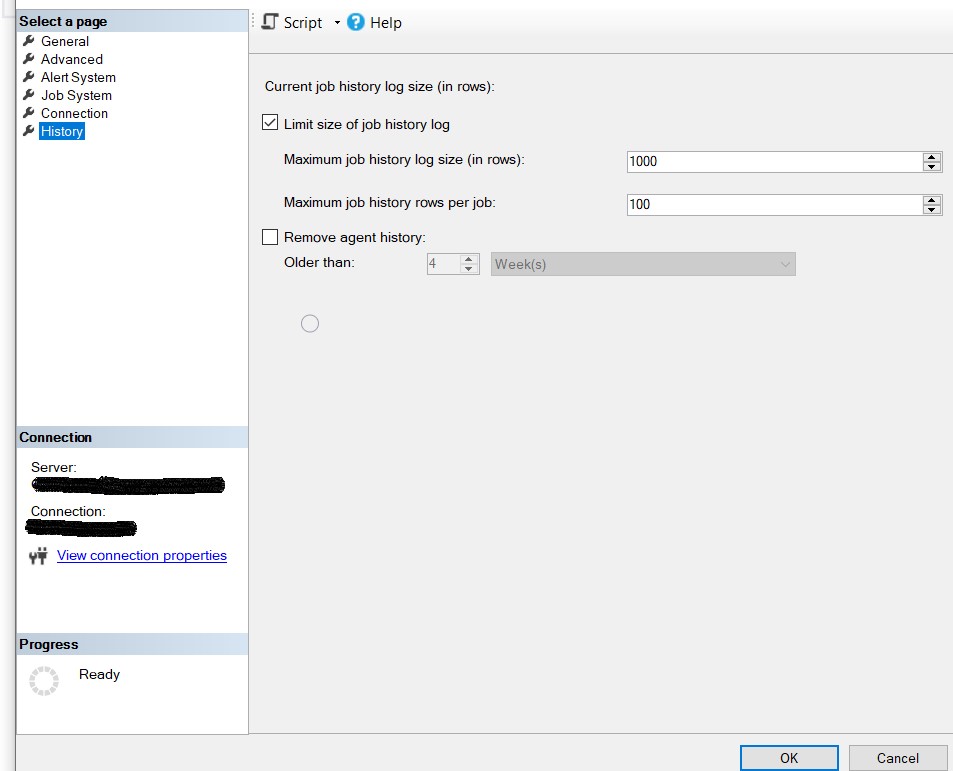
Prior to our foray into the world of Azure, the setting for the Agent Job history could be changed within SSMS, by right-clicking on ‘SQL Server Agent’, selecting ‘Properties’ and then the ‘History’ page.
Figure 1: Job History settings via SSMS
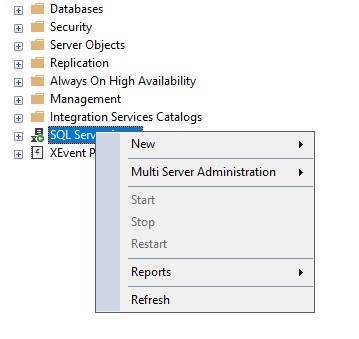
Trying this within the Azure MI, and the ‘Properties’ option on the menu isn’t listed, and neither are ‘Find Invalid Objects’ or ‘Start PowerShell’.
Figure 2: Agent Properties Within SSMS
Now, within Azure SQL Database (another flavour of MI) most of the options available through SSMS are no longer available, but this is SQL Server Managed Instance, so the level of control we have is better. Sometimes.
So, I assumed that there must be a way to see and update these values but had no idea how at this point.
Undocumented Stored Procedures
At first, the idea of an undocumented feature or functionality is a little unnerving. If Microsoft haven’t documented it, then should you really be using it? And if it isn’t documented then there is always the possibility that it could be altered or removed without any warning.
Although they should be treated with some respect, a lot of undocumented procedures are in regular use (‘sp_MSForEachDB’ is a good example). But if you’re going to rely upon them, you need to test that they still work after upgrades to SQL Server.
In my case, I’m interested in sp_get_sqlagent_properties and sp_set_sqlagent_properties. As the names imply, one retrieves the agent properties and the other can change the agent properties.
They’re both stored as System Stored Procedures within the msdb database, so you can look at the code, which does have some comments within it.
The various values for the SQL Server Agent are stored within the registry and these procedures access those. So, this would be a better option than attempting to update the registry yourself, as I’ve seen recommended elsewhere.
Executing msdb.dbo.sp_get_sqlagent_properties without any parameters selects a range of values, including those that I’m interested in – the maximum rows of history per job and the maximum number of rows overall.
Figure 3: Results from msdb.dbo.sp_get_sqlagent_properties;

Using sp_set_sqlagent_properties to change the values is straightforward.
Figure 4: Changing the Agent History Retention:

And repeating msdb.dbo.sp_get_sqlagent_properties, shows that the history values have been updated.
Figure 5: The new History Values

Conclusion
As the cloud environments evolve, we may find that some controls and tools are more restricted in what we can do. Being able to enquire and update setting via T-SQL, with an understanding of undocumented procedures is likely to become more important.
References
Undocumented Stored Procedures – Redgate
 Notes on SQL