
A recently created email profile had the wrong name, so needed to be changed. It isn’t possible to change it via the SSMS wizard and I struggled to find an article for such a thing. Then I turned to CoPilot, and it was wrong. To be fair to that software, there is a warning that the answers might be incorrect. However, the references that it provided gave me the threads that I could follow.
Renaming the Profile
There is a SQL command for changing the name or description of a profile – msdb.dbo.sysmail_update_profile_sp.
It has three parameters – the profile id, the profile name and the description for the profile.
If you supply the profile name, then you can change the description – but you can’t change the profile name. If you want to change the profile name (or the profile name and description at the same time), you need to supply the profile id.
To retrieve the profile id – msdb.dbo.sysmail_help_profileaccount_sp.
The documentation is slightly misleading on this too. The entries for the first two parameters state, “Either @profile_id or @profile_name must be specified.” And yet, under ‘Remarks’ it states, “When no @profile_id or @profile_name is specified, this stored procedure returns information for every profile in the instance.”
In this environment there is only one mail profile and executing it without any parameters gives me the information that I’m after.
Figure 1: Retrieving the profile id
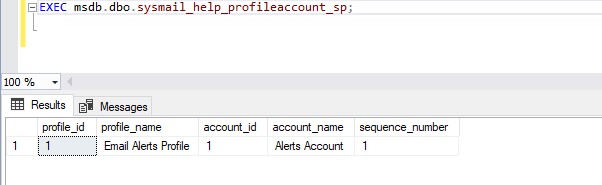
In my case, the profile_id is 1.
This can then be used to change the name, which at this point is ‘Email Alerts Profile’, to ‘SQLAlerts’.
Figure 2: Renaming the Profile
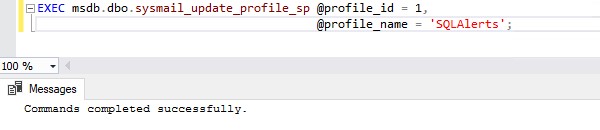
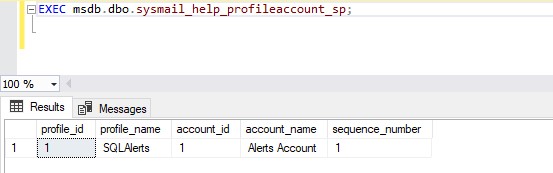
Repeating the call to sysmail_help_profileaccount_sp shows that the name has been altered.
Figure 3: The New Profile Name
I can then test this mail profile works as required by calling msdb.dbo.sp_notify_operator, which uses this profile to send a test email to the associated operator.
Figure 4: Testing the Email to an operator works
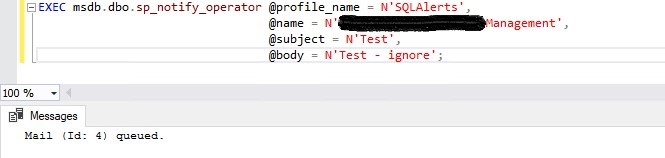
From the response of the last command, you can see a message has been queued. All email accounts associated with the operator’s name receive an email with that subject and body within a couple of minutes
 Notes on SQL